Emby-Home-Swiper-UI
🚀 Emby & Jellyfin Home Swiper UI
📖 Overview
Emby Home Swiper UI replaces the default library grid on your Emby & Jellyfin home page (#!/home) with an interactive, cinematic Swiper banner carousel. It dynamically queries your media server’s native APIs to showcase the newest, trending, and top-rated movies and TV series — with zero external library overhead for core functionality.
Beyond the home banner carousel, this all-in-one repository also provides:
- 🌟 Community Ratings & Production Year Badges
- 🎬 External Player Integration (PotPlayer, MPV, VLC)
- 📢 Item Detail Announcement & Notice Boxes (
text_sider) - 🎨 Dedicated Jellyfin Web Theme & Carousel
- ⚡ 1-Click Shell and Batch Setup Scripts
📸 Visual Previews
🎞️ Emby Home Swiper Carousel (V2)



🍿 Jellyfin Home Carousel & Theme


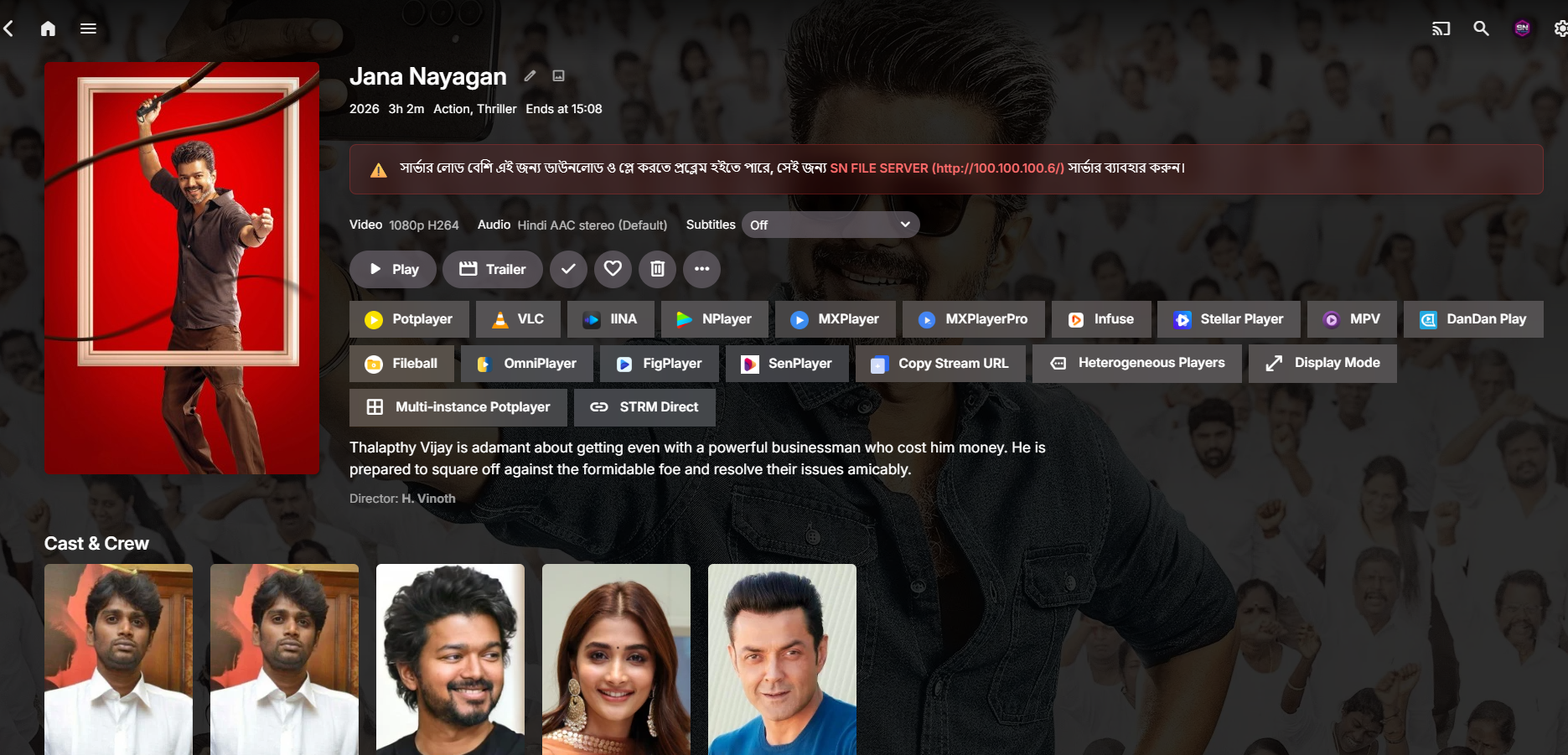
🎬 External Player Integration (emby-player)
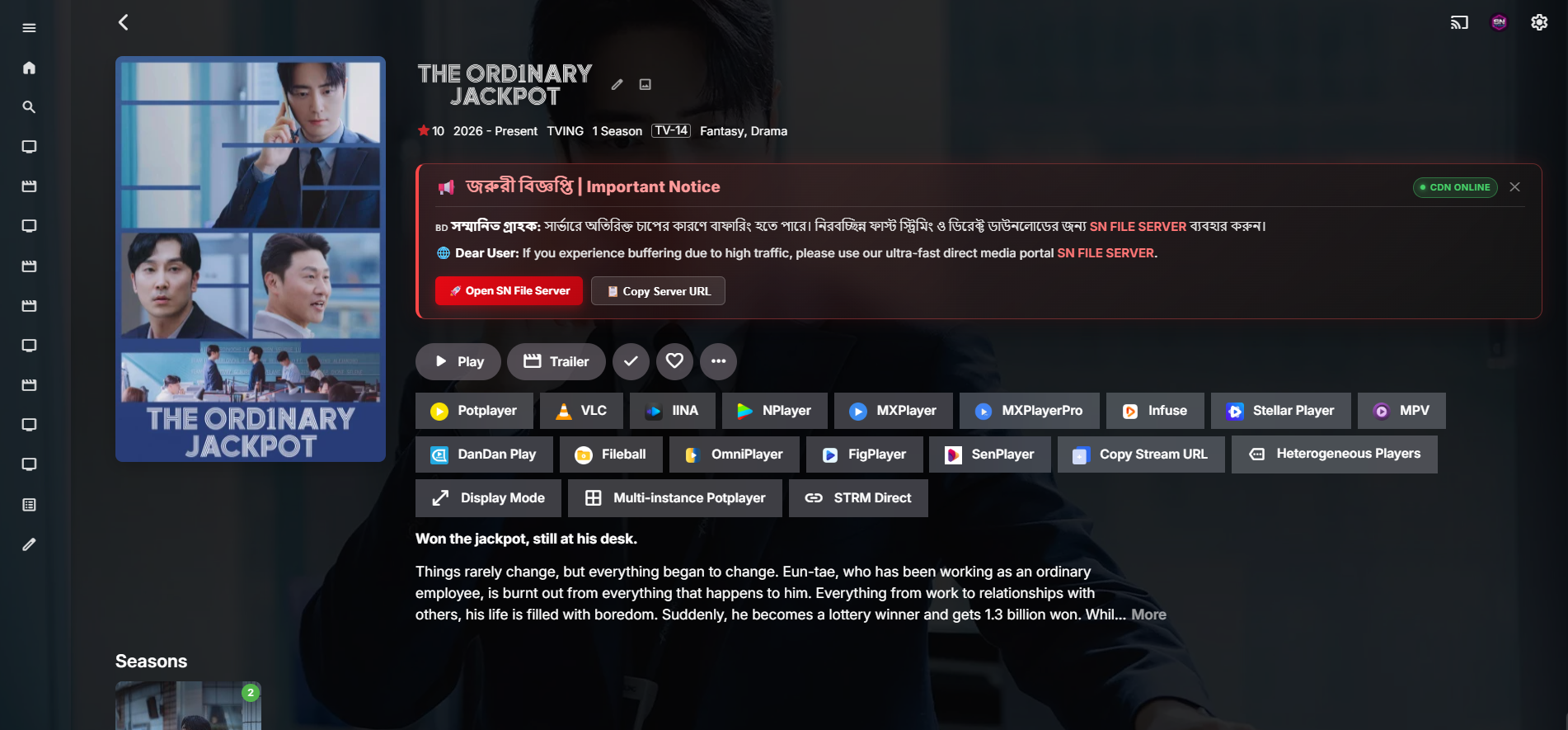
📢 Item Detail Notice & Announcement Box (text_sider)
✨ Key Features
| Category | Feature | Description |
|---|---|---|
| 🚀 Performance | Ultra-Lightweight | Pure native JavaScript utilizing Emby/Jellyfin internal ApiClient. Minimal memory footprint. |
| 🖼️ Visuals | High-Res Backdrops & Logos | Automatically renders clear transparent PNG logos, backdrop fanart, taglines, and synopsis. |
| ⭐ Metadata | Rating & Year Badges | (V2) Displays Community Rating (e.g., ⭐ 8.5/10), Production Year (e.g., 2024), and Official Content Rating (PG-13, TV-MA). |
| 🔄 Animation | Auto-Slide & Pause on Hover | Rotates slides smoothly every 6–8 seconds; automatically pauses when hovering for uninterrupted reading. |
| 📱 Responsiveness | Fully Responsive Layout | Adaptive styling seamlessly scales between 4K TVs, Ultrawide monitors, Laptops, Tablets, and Smartphones. |
| 🎯 Navigation | Interactive Controls | Next / Previous buttons, clickable pagination bullet dots, and keyboard/touch swipe navigation. |
| 🍿 Playback | External Player Routing | Launch streams straight into PotPlayer (Windows), MPV (via mpv-handler), VLC, and MX Player. |
| 📢 Announcements | Detail Page Alert Box | Inject customizable multilingual notice banners on media detail pages with smooth kinetic animation. |
| 🛡️ Reliability | Graceful Error Handling | Fallback backdrops and error catches prevent layout breaks when metadata or fanart is missing. |
📂 Repository Structure & Modules
Emby-Home-Swiper-UI/
├── home-swiper-v2/         # 🌟 Advanced Swiper with Ratings, Year & UI upgrades
│   ├── home-swiper.js      # Clean Swiper script
│   ├── home_rating with year.js # Swiper with Community Rating ⭐ & Year 📅 badges
│   └── img/                # V2 Screenshots
├── home-sider-v1/          # 📦 Classic lightweight home banner slider
│   ├── home.js             # V1 base swiper logic
│   └── img/                # V1 Screenshots
├── Jellyfin/               # 🍇 Dedicated Jellyfin Web integration
│   ├── jellyfin/           # Styles, main.js, jQuery & MD5 dependencies
│   ├── script.sh           # Auto setup script for Jellyfin Web
│   └── img/                # Jellyfin Screenshots
├── emby-player/            # 🎬 External player launcher (PotPlayer, MPV, VLC)
│   ├── emby_launch_player.js
│   └── README.md
├── text_sider/             # 📢 Media detail page announcement & notice boxes
│   ├── Text Slider Box.html
│   ├── Text No Slider Box.html
│   └── Text Warning Box.html
├── script.sh               # 🐧 Linux/Docker automatic installation script
├── setup-swiper.sh         # 🐧 Enhanced Linux/Docker injection script
├── download-homejs.bat     # 🪟 Windows PowerShell auto-download script
├── upload.bat              # 🛠️ Git upload helper script
└── README.md               # 📖 Main documentation
🛠️ Installation Guide
Choose your platform and preferred installation method below:
🌟 Option 1: Emby Server (Manual Setup — Recommended)
Step 1: Locate your Emby Web dashboard directory
Find the dashboard-ui folder on your server:
- Synology NAS:
/volume1/@appstore/EmbyServer/system/dashboard-ui/ - Docker (
lovechen/embyserveror official Emby Docker):/system/dashboard-ui/ # or locate via: docker exec -it <container_id> find / -name "index.html" - Linux (Debian/Ubuntu):
/opt/emby-server/system/dashboard-ui/ - Windows:
C:\Users\<YourUser>\AppData\Roaming\Emby-Server\system\dashboard-ui\
Step 2: Download & Copy the Script
- Choose your preferred version: home-swiper-v2/home_rating with year.js (⭐ Ratings & Year Edition - Recommended), home-swiper-v2/home-swiper.js (Minimal), or home-sider-v1/home.js (Classic).
- Rename the selected file to
home.jsand copy it directly into yourdashboard-ui/directory (or inside a subfolder likedashboard-ui/emby-crx/home.js).
Step 3: Inject the Script in index.html
Open dashboard-ui/index.html with a text editor and add the script tag just before the closing </head> or </body> tag:
<!-- Emby Home Swiper UI -->
<script src="home.js" defer></script>
(If placed in a subfolder like emby-crx/home.js, use <script src="emby-crx/home.js" defer></script>)
Step 4: Refresh & Enjoy
Restart your Emby server or clear your browser cache and refresh (Ctrl + F5). Navigate to #!/home to see your new Swiper banner in action!
⚡ Option 2: Emby Automated Setup (Linux / Docker)
Run the included automated setup script in your dashboard-ui directory:
# Navigate to your dashboard-ui folder
cd /path/to/emby/system/dashboard-ui/

# Download and execute the automated setup script
curl -sSL https://raw.githubusercontent.com/sohag1192/Emby-Home-Swiper-UI/main/setup-swiper.sh | bash
🍇 Option 3: Jellyfin Server Installation
- Copy the contents of the
Jellyfin/jellyfin/directory into your Jellyfin web root folder:- Linux:
/usr/share/jellyfin/web/ - Windows:
C:\Program Files\Jellyfin\Server\jellyfin-web\ - Docker:
/jellyfin/jellyfin-web/
- Linux:
- Edit
index.htmlin your Jellyfin web directory and insert the following before</head>:
<!-- Jellyfin Swiper UI Assets -->
<link rel="stylesheet" id="theme-css" href="jellyfin-crx/style.css" type="text/css" media="all" />
<script src="jellyfin-crx/jquery-3.6.0.min.js"></script>
<script src="jellyfin-crx/md5.min.js"></script>
<script src="jellyfin-crx/main.js"></script>
- Restart Jellyfin:
sudo systemctl restart jellyfin
🎬 Option 4: External Player Launcher (emby-player)
Route media playback directly to third-party desktop players (PotPlayer, MPV, VLC):
- Copy
emby-player/emby_launch_player.jsinto yourdashboard-ui/emby-player/folder. - In
dashboard-ui/index.html, add the following right before</body>:
<!-- External Player Hook -->
<script src="emby-player/emby_launch_player.js" defer></script>
Requirements for External Players:
- PotPlayer (Windows): Ensure PotPlayer is installed. Soft subtitles and direct streams are supported out-of-the-box.
- MPV (Windows/macOS/Linux): Requires mpv-handler protocol handler installed locally.
📢 Option 5: Item Detail Notice Box (text_sider)
To display announcement banners or server status warnings on media item detail pages (#!/item?id=...):
- Open
text_sider/Text Slider Box.html(orText Warning Box.html). - Copy the
<style>and<script>blocks into yourdashboard-ui/index.htmlright before</body>. - Customize your alert title and message text in the code as desired.
🧩 Option 6: Browser Extension (Tampermonkey / Violentmonkey)
If you do not have root/admin access to modify the server’s files, you can inject the script on your client side:
- Install Tampermonkey or Violentmonkey extension in your browser.
- Create a new UserScript with the following header:
// ==UserScript==
// @name         Emby Home Swiper UI
// @namespace    https://github.com/sohag1192/Emby-Home-Swiper-UI
// @version      2.0
// @description  A dynamic banner carousel for Emby Web
// @match        *://*/web/index.html*
// @match        *://*/*/web/index.html*
// @require      https://raw.githubusercontent.com/sohag1192/Emby-Home-Swiper-UI/main/home-swiper-v2/home_rating%20with%20year.js
// @grant        none
// ==/UserScript==
⚙️ Customization & Configuration
You can easily adjust settings inside home.js / home-swiper.js:
// In class HomeSwiper.start():

this.itemQuery = {
    ImageTypes: "Primary,Backdrop",
    EnableImageTypes: "Primary,Backdrop,Banner,Logo",
    IncludeItemTypes: "Movie,Series", // Filter item types (e.g. "Movie", "Series", "BoxSet")
    SortBy: "DateCreated",            // Sort order: "DateCreated", "PremiereDate", "CommunityRating", or "Random"
    SortOrder: "Descending",
    Recursive: true,
    Limit: 10,                        // Maximum number of banner slides
    Fields: "Taglines,Overview,ParentId,DateCreated,PremiereDate,ProductionYear,CommunityRating,OfficialRating"
};

this.slideDelay = 6000;              // Slide rotation duration in milliseconds (e.g., 6000 = 6 seconds)
this.showItemNum = 9;                // Number of items to display
🧪 Troubleshooting & FAQ
1. The banner is not appearing on the home page
- **Check the URL Route:** The script only triggers on the home route: `#!/home`. Make sure you are on the main dashboard home page. - **Open Developer Tools (`F12`):** Check the **Console** tab for any red errors. - **Verify `ApiClient` Availability:** In the browser console, type: ```javascript console.log(ApiClient); ``` If `ApiClient` is undefined, make sure the script is loaded with `defer` or placed right before `</body>`. - **Manually Initialize:** Test if the swiper initializes by typing in the console: ```javascript HomeSwiper.init(); ```2. Images or logos are missing / blank
- Check if your media items have backdrops and clear logos identified in Emby/Jellyfin metadata. - If an item doesn't have a Logo, the script will fall back gracefully to text title or primary poster fanart.3. Changes disappear after Emby or Jellyfin server updates
- Server updates can sometimes overwrite `index.html`. - Keep a backup of your `home.js` script and simple injection line, or run `setup-swiper.sh` again after server updates.4. How do I clear cache after updating scripts?
- Perform a hard refresh: `Ctrl + Shift + R` (Windows/Linux) or `Cmd + Shift + R` (macOS). - On mobile devices, clear browser cached site data.🧪 Tested Compatibility
| Platform / Browser | Version | Status |
|---|---|---|
| Emby Web Client | 4.9.1.80 – 4.10.1.0+ | ✅ Supported (Tested OK) |
| Emby Server / Web | Version [4.10.1.0] (version=4.10.1.0) |
✅ Test Done & Working (OK) |
| Emby Server / Web | Version [4.10.0.40] (version=4.10.0.40) |
✅ Tested & Working (OK) |
| Jellyfin Web Client | 10.8.x – 10.11.x+ | ✅ Supported |
| Google Chrome / Chromium | Latest | ✅ Supported |
| Mozilla Firefox | Latest | ✅ Supported |
| Microsoft Edge | Latest | ✅ Supported |
| Apple Safari (macOS / iOS) | Latest | ✅ Supported |
| Mobile Browsers (Android / iOS) | Responsive View | ✅ Supported |
[!NOTE] Compatibility Verified: Tested and confirmed working on Emby Web / Server Version [4.10.1.0] (
version=4.10.1.0) (test done) and Version [4.10.0.40] (version=4.10.0.40).
🤝 Contributing & Contact
Contributions, bug reports, feature suggestions, and pull requests are welcome!
If you find a bug or have an idea to improve the UI, feel free to open an Issue or submit a Pull Request.
💖 Support & Sponsorship
Hello Viewers & Developers! 🌟
If you find this project, custom UI components, or media streaming scripts helpful in your own setup, here are several ways you can support continuous development, hosting, and server maintenance costs:
 |
| 📱 **bKash (Personal)** | Send Money (Bangladesh) — Contact on Telegram |
|
| 📱 **bKash (Personal)** | Send Money (Bangladesh) — Contact on Telegram |  |
| ⚡ **Nagad (Personal)** | Send Money (Bangladesh) — Contact on Telegram |
|
| ⚡ **Nagad (Personal)** | Send Money (Bangladesh) — Contact on Telegram |  |
| ☕ **Buy Me A Coffee** | Global Creator & Developer Support |
|
| ☕ **Buy Me A Coffee** | Global Creator & Developer Support |  |
| ⭐ **Star Repositories** | Free Community Support on GitHub |
|
| ⭐ **Star Repositories** | Free Community Support on GitHub |  |
|
💎 Crypto Wallet Address (SOL / USDT / Multi-Chain):
9YEThZFaqmqPbPJt8f4jLxPKELMzUmgncsrqvCv44BjE
[!NOTE] 💡 Hover over or tap the code box above and click the Copy (📋) button in the top-right corner to copy the wallet address instantly.
📜 Credits & Acknowledgments
- Nolovenodie/emby-crx — Original foundation and inspiration for Emby Web UI customization.
- frostyleave/emby-crx-for-jellyfin — Inspiration for Jellyfin web client adaptation.
- bpking1/embyExternalUrl — Foundational inspiration for the external player invocation logic.
📄 License
This project is licensed under the MIT License — free to use, modify, and distribute with attribution.